
How to Generate Leads on LinkedIn: A B2B Lead Generation Guide
LinkedIn B2B lead generation only takes seven steps. Define your ideal customer, optimize your LinkedIn profile, build a targeted lead list, reach out to prospects, nurture trust, scale your efforts, and optimize everything. Et voilà, that’s how you land your first leads.
LinkedIn is the most effective channel for attracting high-quality prospects. At least, that’s what 40% of B2B marketers say. Follow the strategy I cover in this post, and you’ll see why it’s earned that reputation.
Read on to learn what LinkedIn lead generation is and who benefits from it most. Then, explore our seven-stage process and see how to bypass LinkedIn’s native limits with data enrichment tools like Skrapp.
Get a verified email list from LinkedIn in an instant
Try SkrappWhat Is LinkedIn Lead Generation?
LinkedIn lead generation is the process of finding, engaging, nurturing, and converting potential clients on LinkedIn into qualified leads.
The platform’s standout feature is that it gives you first-party professional data right out of the box. You can narrow your lead search by job title, seniority, industry, location, company size, and more. That’s a world away from traditional B2B lead generation, where you often have to dig through business directories or contact lists of questionable fit — and sometimes quality.
Here’s what you gain with lead generation on LinkedIn and, on the flip side, the limitations you’ll need to work around:
| LinkedIn’s advantages | LinkedIn’s limitations |
|---|---|
| Abundant self-reported lead data | Potentially high cost per lead |
| Precise professional targeting | Connection request limits |
| Massive user base of over 1.3 billion | Limited outreach at scale |
| Direct access to B2B decision-makers |
Which LinkedIn Lead Generation Approach Fits You?
There are three ways to generate leads on LinkedIn: outbound prospecting, organic social selling, and paid acquisition.
Ideally, your strategy should combine all three in proportions that match your goals and resources. That said, it’s not a strict rule. You can start with one or two approaches and build from there.
But first, let’s look at each option.
- Outbound prospecting is a proactive approach where you define your ideal customer, find those who fit the bill, and reach out to them directly
- Organic social selling uses content and everyday platform activity, such as publishing posts or commenting on discussions, to attract prospects without buying ads
- Paid acquisition uses LinkedIn Ads, Lead Gen Forms, and Sponsored Content to extend your reach beyond organic and outbound efforts
| Outbound prospecting | Organic social selling | Paid acquisition | |
|---|---|---|---|
| Used for | Connecting with prospects directly | Building credibility, trust, and inbound interest | Reaching a targeted audience fast |
| Time to results | Fast | Slow | Immediate |
| Investment | Low to medium, requires prospecting or enrichment tools | Low, demands consistent effort and content creation | High, requires dedicated ad spend |
| Scalability | Medium, restricted by LinkedIn limits unless paired with email outreach | Medium to high, great content can reach lots of potential clients over time | High, scales anytime you increase your budget |
| Best fit | Solo B2B founders, small teams and agencies | Founders, subject-matter experts, teams prioritizing long-term credibility | Growing B2B companies with proven offers and high LTV |
| Main limitation | Connection and InMail limits on LinkedIn | Takes months of consistent work | High cost per lead |
Let’s say you can’t use all approaches at once. Which one should you choose then? This depends on who you’re targeting and the resources you have.
For example, a solo founder with high-value products or services can start with outbound prospecting and an optimized LinkedIn profile. If you have a sufficient advertising budget and a clear idea of your ideal customer, try LinkedIn Ads. Teams with tighter resources can combine organic social selling with light outbound.
How to Generate B2B Leads on LinkedIn: A 7-Step System
As I mentioned earlier, lead generation via LinkedIn is just seven steps away. You begin with the prep work: defining your ideal customer, turning your LinkedIn profile into a landing page, and creating a lead list. Then comes the action: starting conversations and building trust. Once it’s done, wrap up by scaling and optimizing your results.
1. Define Your Ideal Customer Profile (ICP)
An ideal customer profile (ICP) describes the type of company most likely to benefit from and purchase your product or service. It’s the very first thing you should determine long before you start generating LinkedIn leads.
Identify your target account criteria
To complete the picture of your ideal customer, analyze the following criteria (all of which you can filter directly in LinkedIn search):
- Industry or vertical your target customer operates in
- Company size based on total headcount
- Location of their headquarters or operating regions
- Annual revenue of a target company
- Technology, including the software and infrastructure they already use
- Growth stage, from newly funded startups to scaling teams and mature enterprises
Don’t be afraid to get specific here. While you might worry that tighter criteria will shrink your prospect list, that’s, in fact, a good thing. It means your targeting is on point.
Build your ideal buyer persona
Once you know which companies to target, define your ideal buyer persona. These are the specific people inside those companies who influence or make purchasing decisions.
Map out your buyer persona using these traits:
- Job title and seniority: Their position, level of authority, place in the company’s hierarchy.
- Responsibilities: The tasks they handle and their typical workday.
- Role in the buying process: Whether they are the decision-maker, the budget holder, an internal champion, or the end user.
You can even give your persona a fictional name and a short description for convenience. For example: Anna, an IT project manager coordinating software implementation.
Map their pain points and needs
With your ICP and buyer persona ready, there’s one last piece to define: your prospect’s pain points and needs.
- Pain points: What frustrations do your prospects face? What have they already tried that didn’t work? Are there any obstacles to purchasing from you?
- Needs: What goals and milestones do your prospects want to achieve? What does a “win” look like for their role?
Gather your assumptions and connect them to what your product or service can actually deliver.
2. Optimize Your LinkedIn Profile as a Landing Page
If you already have a complete LinkedIn profile, that’s a great foundation. To make it even more effective, optimize it like a landing page.
This means you have to reach two goals. First, make your profile easier for the right people to find. Next, give them reasons to trust your expertise and choose your offer.
Work on the design
Just like a landing page, your LinkedIn profile’s visual look creates the first impression. Mess it up, and prospects will bounce before even reading a word. Make sure to include these elements:
- A professional profile picture, preferably a headshot
- A relevant banner image with your key offerings or expertise outlined
Optimize for search visibility
SEO principles apply to LinkedIn, too.
Similar to how keywords help a landing page rank higher on Google, relevant industry and role keywords throughout your profile let you make it to LinkedIn searches. They also allow your prospects to see your expertise right away.
Besides on-page optimizations, you can customize your public profile URL so it’s easy to search and share.
Write a high-converting headline and About section
Even the most relevant keywords make no sense if your messaging is vague. Use your headline and About section to communicate who you help and what you offer.
Here’s how to make both sections more converting:
- Your headline: Go beyond your job title but keep everything concise. Briefly state who you work with and the results you deliver.
- Your About section: Tell your professional story. But avoid turning it into your autobiography. When writing the description, keep your profile visitor in mind — outline the problems you solve and how you do that.
Add social proof
No landing page is complete without trust signals, and your LinkedIn profile is no different. Back up your messaging and claims with:
- Recommendations from past clients or colleagues
- Skills and credentials that demonstrate your expertise
- Achievements that show what you’ve delivered, ideally with measurable outcomes
For more practical tips, check out our guide to LinkedIn profile optimization.
3. Build a Targeted B2B Lead List
With your ICP determined, you can create a targeted B2B lead list. All you need is basic LinkedIn (or Sales Navigator), Skrapp, and a bit of manual research.
Use LinkedIn filters to match your ICP
LinkedIn has impressive filtering capabilities. Once you know who you’re looking for, type in your search query and narrow the results using filters that fit your ICP. This may include industry, company size, location, job title, seniority, and other criteria.
Find multiple contacts within target accounts
Don’t rely on a single contact at each company you target; it’s risky. If that person is busy or suddenly quits the job, you have to start from scratch. Instead, look for several decision-makers and relevant stakeholders inside each account.
To find multiple contacts, open a target company’s LinkedIn page. Head to the People tab and filter employees by job title, department, or keyword. Save those who best match your buyer personas.
Export and enrich LinkedIn leads with Skrapp
A list of LinkedIn prospects is just part of the job. You also need actionable contact data to reach them outside the platform.
Skrapp’s LinkedIn email finder lets you enrich prospect data with verified email addresses and export your list in a few steps:
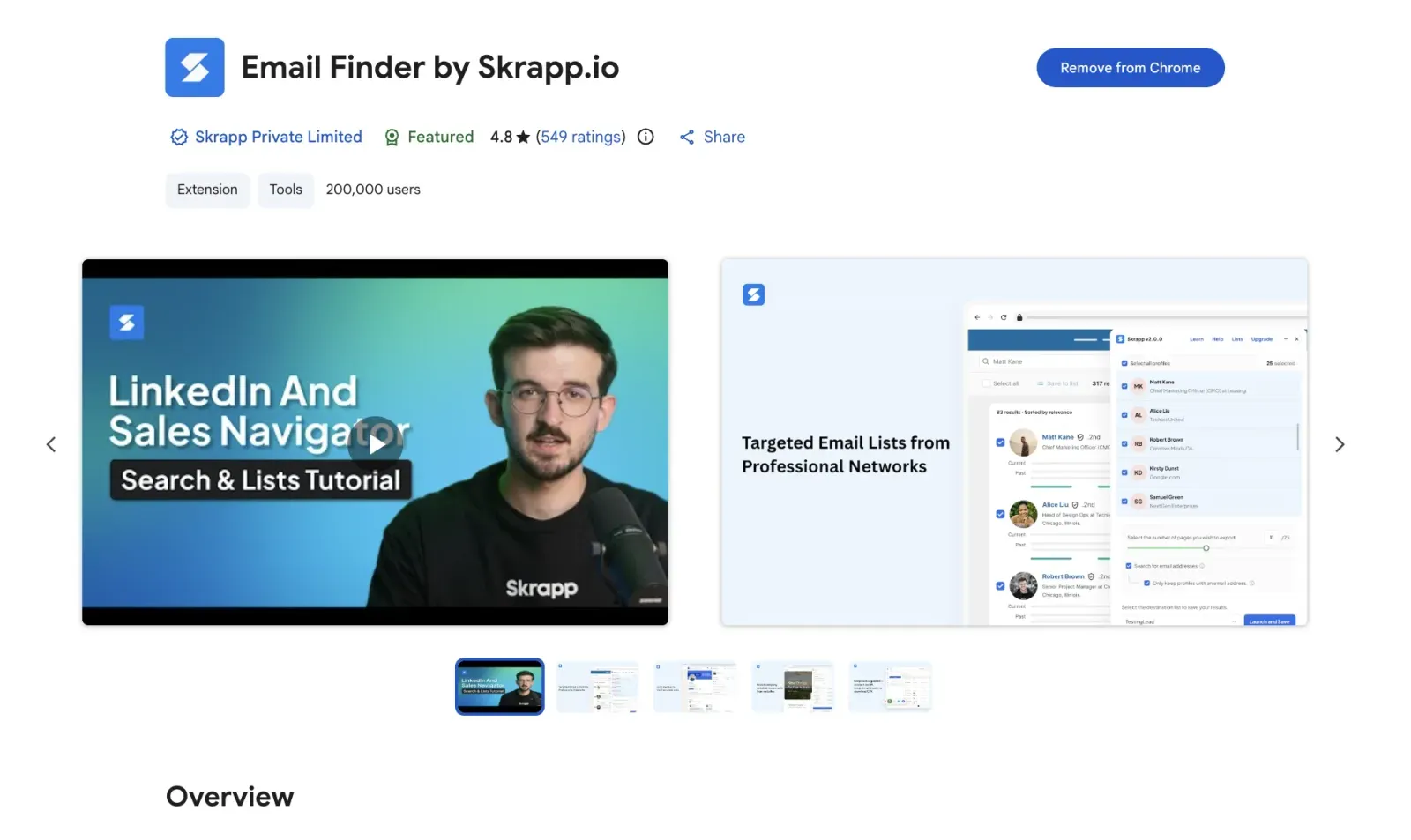
- Install the Skrapp Chrome extension and access it while browsing LinkedIn
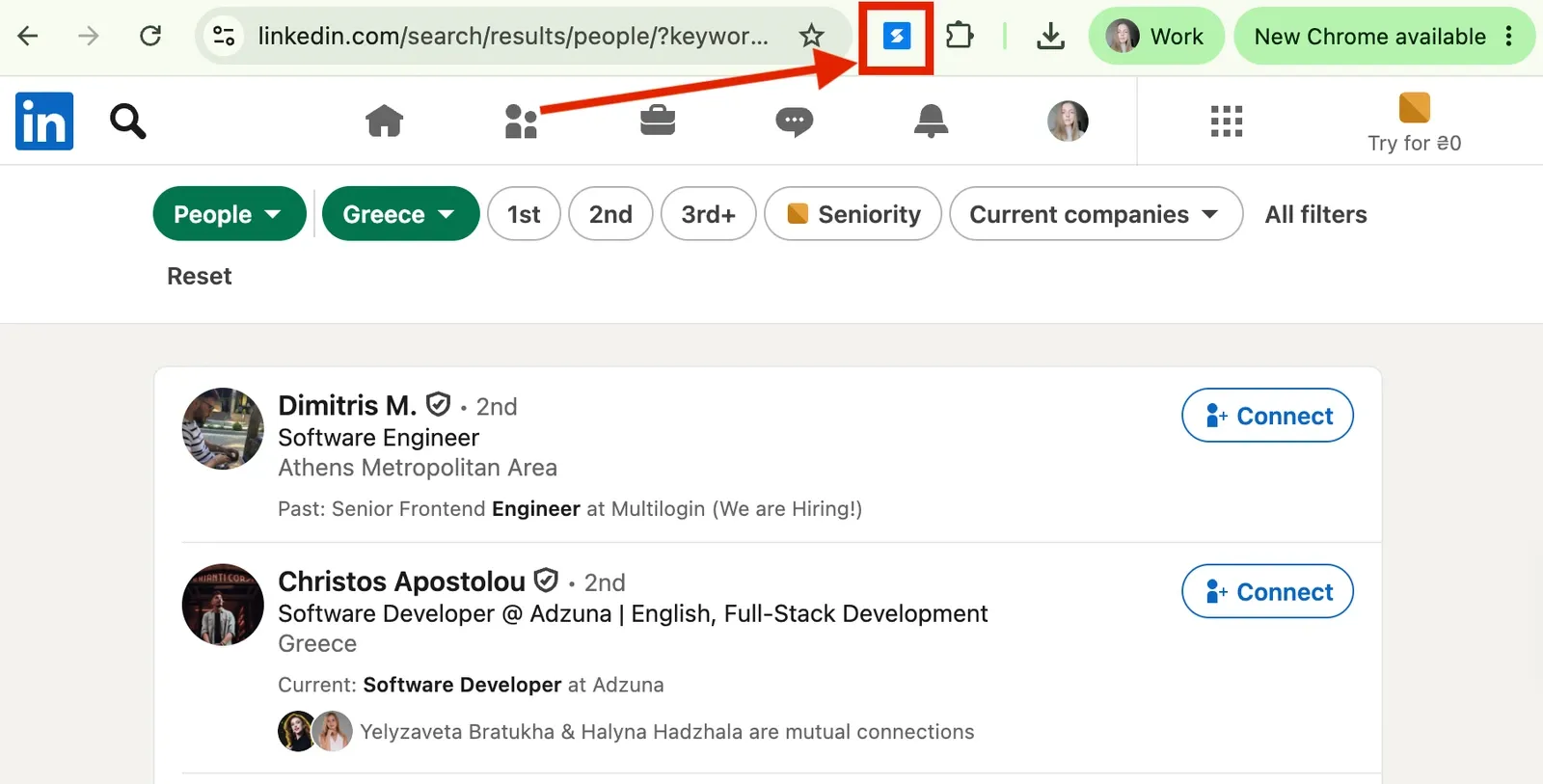
- Open an individual profile or a relevant search results page
- Click the Skrapp icon to find and verify the prospect’s email
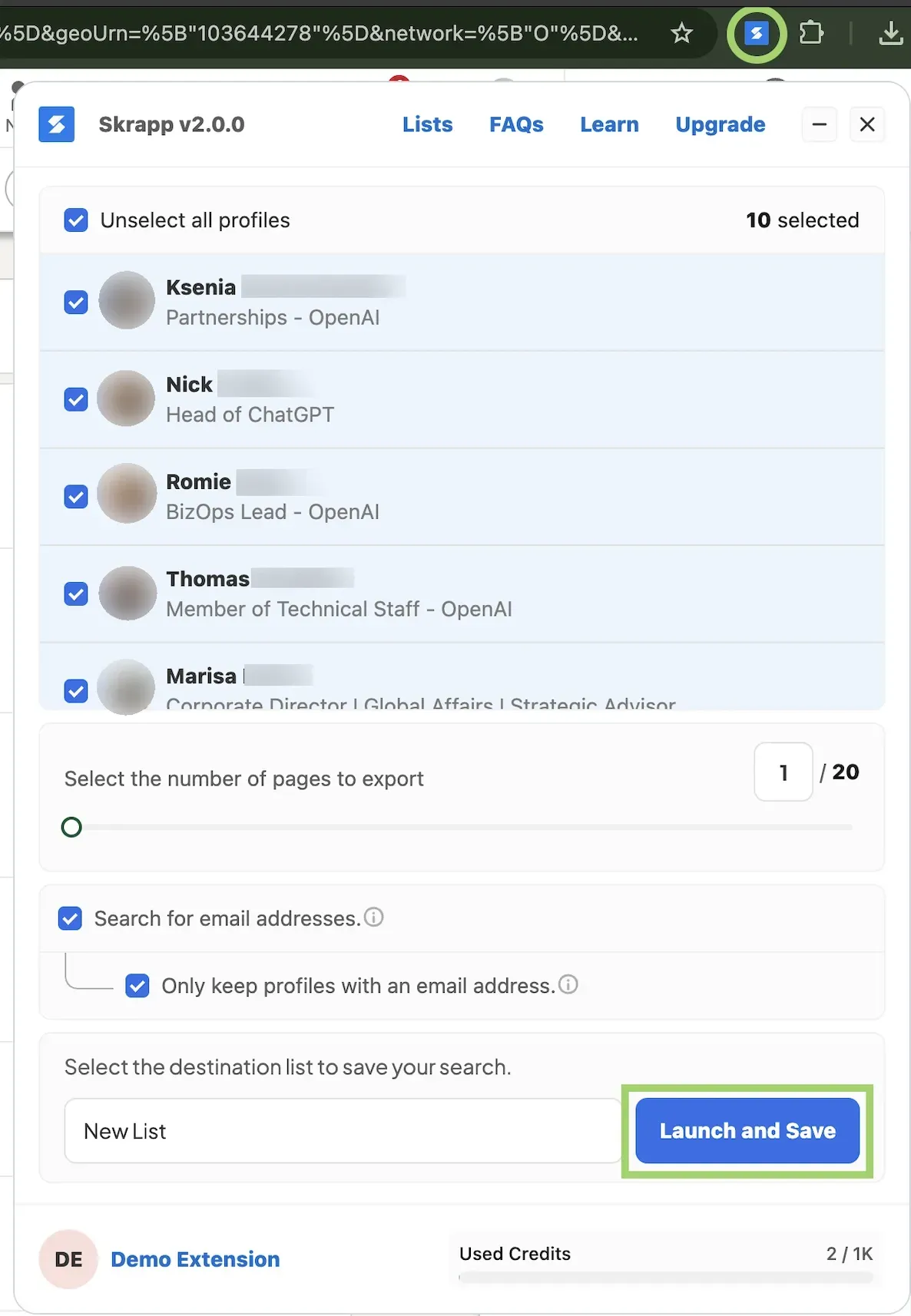
- Save selected contacts to your Skrapp lists or bulk-export them to a CSV file
4. Engage Prospects and Start Conversations
Now that you have a curated list of prospects and their contact info, engage with them. You can do this by sending personalized connection requests and following up on LinkedIn, email, or both.
Send personalized connection requests
LinkedIn is a professional networking platform, so network first before jumping straight into a sales pitch.
If your profile is brand new, start by connecting with people you already know. These can include your colleagues, existing clients, industry peers, or anyone else in your network. Adding these people will make your profile look more credible when you reach out to cold prospects.
Once you set up your basic network, send invitations to the prospects on your lead list. Keep in mind that LinkedIn restricts connection requests to roughly 100 invitations per week. So make each one of them count.
To increase your acceptance rate, you can attach a personalized connection request note. LinkedIn lets you:
- Add a note to up to three connection requests per month
- Write a short message with a maximum of 200 characters
The exception is premium members. Those can attach personalized notes to all their connection requests.
When adding a note, refer to something specific about the person, such as a recent post they published or a professional achievement they shared. Never pitch your product or service in the connection request. For example:
Hi [Name], I enjoyed your recent post on [Topic]. I work in [Industry] as well and would love to connect.
You can also make prospecting less manual with Skrapp’s Auto Connect & Follow feature. Available on Professional and Enterprise plans, it combines connection requests and profile follows with data enrichment in one workflow.
Let Skrapp handle connection requests — focus on the actual conversations
Upgrade to Pro or EnterpriseReach out with relevant messages
Lead generation through LinkedIn typically involves three types of messages: the connection note we just covered, the first message, and the follow-up.
Here’s a way to structure your LinkedIn outreach sequence:
- Send the first message (after the connection is accepted): Thank the prospect for connecting and reference the context from your invite. You might mention a challenge in their industry, a recent post, your observation, and so on. Keep this message short and end with one easy-to-answer question.
- Follow up the first time (after 3 to 4 days): If you haven’t received a reply, send a reminder that adds something you haven’t previously mentioned. This can include a helpful resource or an industry insight. Avoid statements that start with “Just checking in.” They add no value and, even worse, sound like desperation.
- Try a different follow-up angle (after 7 to 10 days): Still no response? Change your approach. Explore another challenge your offer can address or ask a simple, binary-choice question that’s effortless to reply to.
- Close the loop (after 2 weeks): Send a brief final note that acknowledges the recipient may have other priorities. Let them know you’re happy to reconnect whenever.
Want more examples and personalization tips on writing effective messages? Read our guide on LinkedIn InMail best practices.
Combine LinkedIn and email outreach
LinkedIn is perfect for starting conversations and exploring your prospect’s professional background. Still, it limits how many connection requests you can send and how many notes you can attach. And if a prospect doesn’t accept your invite, your only way to message them on LinkedIn is through paid InMail credits.
In this context, email gives you another channel for starting or continuing a conversation.
Here’s how to combine the two:
- Use LinkedIn to get familiar with your prospects
- Use email to develop the conversation
- Coordinate your follow-ups between both channels
Need email addresses for your outreach? Jump back to Step 3 to see how Skrapp helps you find and verify contact details.
Take your outreach outside LinkedIn with verified email addresses from Skrapp
Get Emails5. Build Trust Through Content and Social Selling
Content and social networking build your brand’s authority and earn prospects’ trust. Hence, your LinkedIn lead generation strategy should include expert content creation, audience engagement, and, where appropriate, LinkedIn Events.
Share expert content
Your goal here is to become a thought leader, or even a LinkedIn influencer, in your niche.
Create content that touches on your audience’s pain points, questions, and challenges. For the most comprehensive coverage, follow the 70-20-10 content ratio:
- 70% value: Helpful tips, how-to guides, industry frameworks, and tool comparisons.
- 20% personal: Behind-the-scenes looks, milestone celebrations, lessons learned from mistakes, and personal stories related to your products or services.
- 10% promotional: Your services, product updates, newsletters, and relevant CTAs.
What about a publishing schedule? Simply stay consistent. Create an editorial calendar so you can plan ahead, and aim to post 2–5 times a week (or at least once a week when starting out).
Engage with your audience
Once you start posting regularly, the likes and comments will follow. First and foremost, keep the conversation going by replying to everyone who comments on your posts.
Next, expand from there. Search LinkedIn for relevant industry keywords and leave comments under top-performing posts from your colleagues or prospects.
Use LinkedIn Events
LinkedIn Events is a feature that lets you host, promote, or attend professional gatherings. They fall into two main categories:
- In-person: Offline events hosted at a physical venue and promoted on LinkedIn. These aren’t streamed to online audiences.
- Online: Either LinkedIn Live events (streamed directly on LinkedIn) or External events (promoted on LinkedIn, but hosted on an external link like Zoom).
You can connect with prospects by joining someone else’s event or organizing your own. After the occasion, view the attendee list to identify potential buyers. To simplify contact collection, use Skrapp to extract emails of attendees in bulk.
6. Scale with Automation, Email, and LinkedIn Ads
After you see that your targeting and messaging bring desired results, scale your efforts. You can automate repetitive LinkedIn actions, bulk-export prospects, verify contact data, and combine LinkedIn with email and paid acquisition.
Automate LinkedIn prospecting and connections
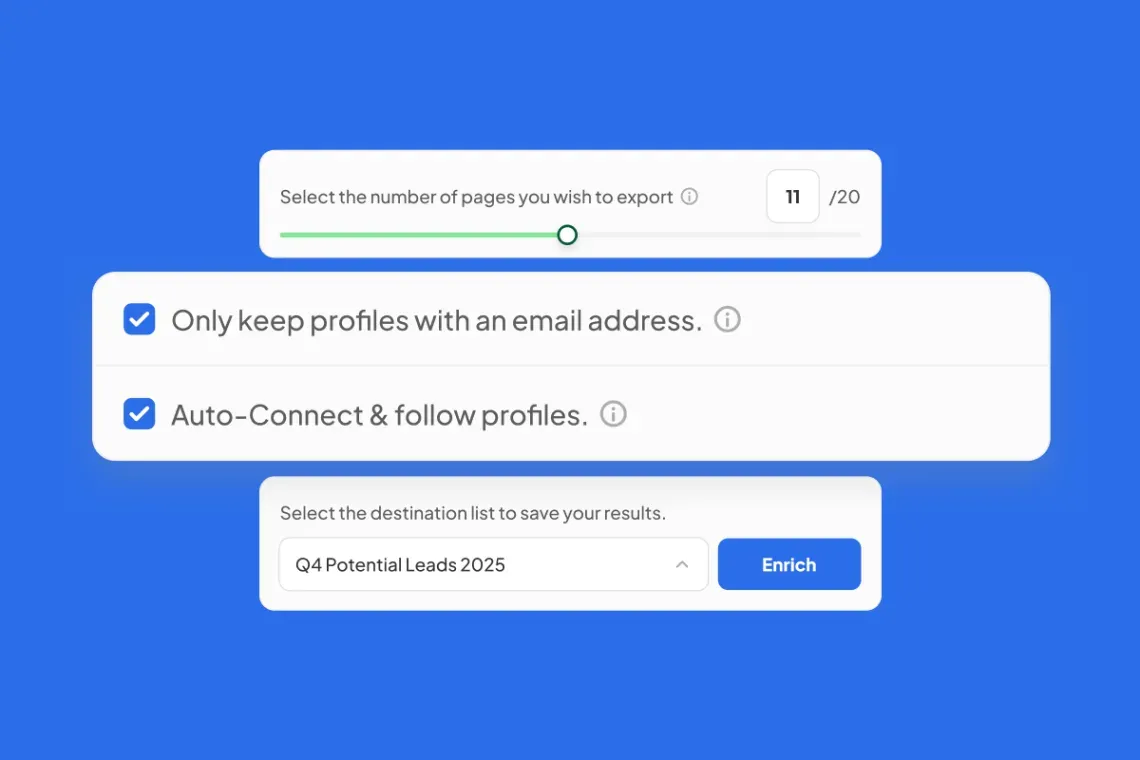
As your prospect list grows, sending invitations manually every time gets exhausting. You can get rid of this repetitive work with Skrapp’s Auto Connect and Follow feature, which automatically:
- Sends connection requests to the profiles in your LinkedIn search results
- Follows each profile so their updates appear in your feed
- Enriches profiles with verified email addresses and company data
Bulk export and verify LinkedIn leads
We’ve briefly discussed this earlier, but combining LinkedIn with cold email is one of the most effective ways to scale your outreach. Instead of looking up each email address individually, use the Skrapp Chrome extension and get a ready-to-use email list instantly.
Here is what the workflow looks like:
Breaking that down, you should first run a search on LinkedIn or Sales Navigator. Select the relevant profiles in the Skrapp extension, then launch the enrichment and verification process. Once it’s done, review your lead list and save it in Skrapp (or export it to CSV/Excel) for further outreach.
Bulk contact enrichment is easier with the right tools
Explore SkrappScale with LinkedIn Ads
Besides organic prospecting and outreach, there’s one more option for how to use LinkedIn for B2B lead generation — LinkedIn Ads. The platform offers plenty of ad formats, but the most popular are:
- Lead Gen Forms: Forms pre-filled with members’ LinkedIn profile info. These let prospects share their contact details in a few clicks.
- Sponsored Content: Native ads (single image, video, document, or carousel) that appear directly in the LinkedIn feed.
- Message Ads: Direct messages sent to prospects’ LinkedIn inboxes with a call to action.
There’s also account-based targeting. It works well if you want to promote your offers to specific high-value accounts or companies.
7. Optimize Your LinkedIn Lead Generation Strategy
Now that you know how to do lead generation on LinkedIn, make sure your efforts pay off. To do this, track performance at each stage, as shown below:
| Funnel stage | Metrics | What to optimize |
|---|---|---|
| Prospecting | Lead volume, lead quality | ICP, search filters, targeting |
| LinkedIn outreach | Acceptance and response rates | Messaging, personalization |
| Email outreach | Delivery, reply, positive response rates | Subject lines, copy, segmentation |
| Lead conversion | Conversion and qualified lead rate | Offer, CTA, qualification |
| Meetings | Meetings booked, show rate | Follow-ups, CTA |
| Pipeline | Opportunities, pipeline, revenue | Lead quality, channels |
LinkedIn Limits, Safety, and Compliance
Before using LinkedIn for sales leads generation, make sure you know the platform’s limits to avoid account restrictions:
- Up to 30,000 1st-degree connections per user
- About 100 weekly connection requests (150–250 weekly with Sales Navigator)
- 0 InMails on Free, 5–15 on Premium, and 50 on Sales Navigator
- Scraping limits of up to 200 profiles on Free, 1,000 on Premium, and 2,500 on Sales Navigator
Respect these boundaries to keep your account safe, and good luck with your outreach!
Use Skrapp to take your LinkedIn prospecting beyond the platform
Install Chrome ExtensionFAQ: LinkedIn Lead Generation
What is LinkedIn lead generation?
LinkedIn lead generation is the process of finding, attracting, engaging, and converting potential customers into qualified leads on LinkedIn. It typically involves defining your ICP, building a lead list, contacting prospects directly on LinkedIn or via email, and guiding them toward a desired action (a conversation with sales reps, a purchase, and so on).
What are the main LinkedIn lead generation strategies?
There are three core LinkedIn lead generation strategies. They include outbound prospecting (direct outreach via connection requests, InMail, and email), organic social selling (attracting prospects through relevant content), and paid acquisition (LinkedIn Ads, Lead Gen Forms, etc.).
Is LinkedIn good for lead generation?
Yes. LinkedIn is particularly useful for B2B lead generation, as it gives you access to over 1.3 billion professionals and decision-makers within companies. It is also considered the most effective channel for high-quality prospects by a big chunk of B2B marketers.
How to use LinkedIn for B2B lead generation?
Generating leads on LinkedIn takes seven steps. First, you should define your ideal customer profile and buyer personas. Then, optimize your LinkedIn profile as a landing page, find prospects using search filters, and build a targeted lead list with Skrapp. Once you do that, reach out to prospects and continue building trust through expert content. Finally, scale with automation, ads, and larger email campaigns, and track results to improve over time.
What are the top LinkedIn lead generation tools?
Native LinkedIn tools such as Sales Navigator are great for advanced targeting and prospecting. To find and verify email addresses, you can use Skrapp or Clay. To automate outreach, try Dripify. Managing leads as they enter sales pipelines is easier with CRMs like HubSpot or Salesforce.
How much does it cost to generate leads on LinkedIn?
Generally, the cost per lead on LinkedIn ranges from $400+ for paid ads to $50 to $150+ for organic or outbound prospecting. As you can see, the cost depends on your LinkedIn lead generation strategy. Organic content is cost-effective, but it requires time and effort. Paid ads are the most expensive, but they bring immediate results. Outbound prospecting sits somewhere in the middle in terms of execution time and price.
How to automate LinkedIn lead generation?
You can automate some parts of the process with prospecting and outreach tools. For example, use Skrapp’s Auto-Connect and Follow feature to send connection requests automatically. The tool also enriches lead lists in bulk. To manage email sequences, you can use Instantly or Lemlist.
Which LinkedIn KPIs to track?
Track funnel performance metrics at each stage. When handling prospecting, pay attention to lead volume and lead quality. Once you launch your outreach campaign, track connection acceptance rate and response rate. Besides that, monitor lead conversion rate and meetings booked, along with general indicators like ROI and cost per lead (CPL).