


Sales Navigator Email Finder
Export leads from Sales Navigator with verified business emails. Works with Core, Advanced, and Advanced Plus. 97% accuracy, free to start.
4.8 on Chrome
Skrapp is not affiliated with, endorsed by, or sponsored by LinkedIn or Microsoft. LinkedIn and Sales Navigator are registered trademarks of LinkedIn Corporation.
Export leads from Sales Navigator
Sales Navigator has no native export and never shows email addresses — so your best-fit prospects stay locked inside LinkedIn. Skrapp fixes that.
Run any Sales Navigator People Search, open a Lead List, or browse an Account Map, then let Skrapp enrich every prospect with a verified business email, job title, seniority, and company data. Export the whole list to CSV in one click — or save it straight to your outreach tool.
Add to Chrome — free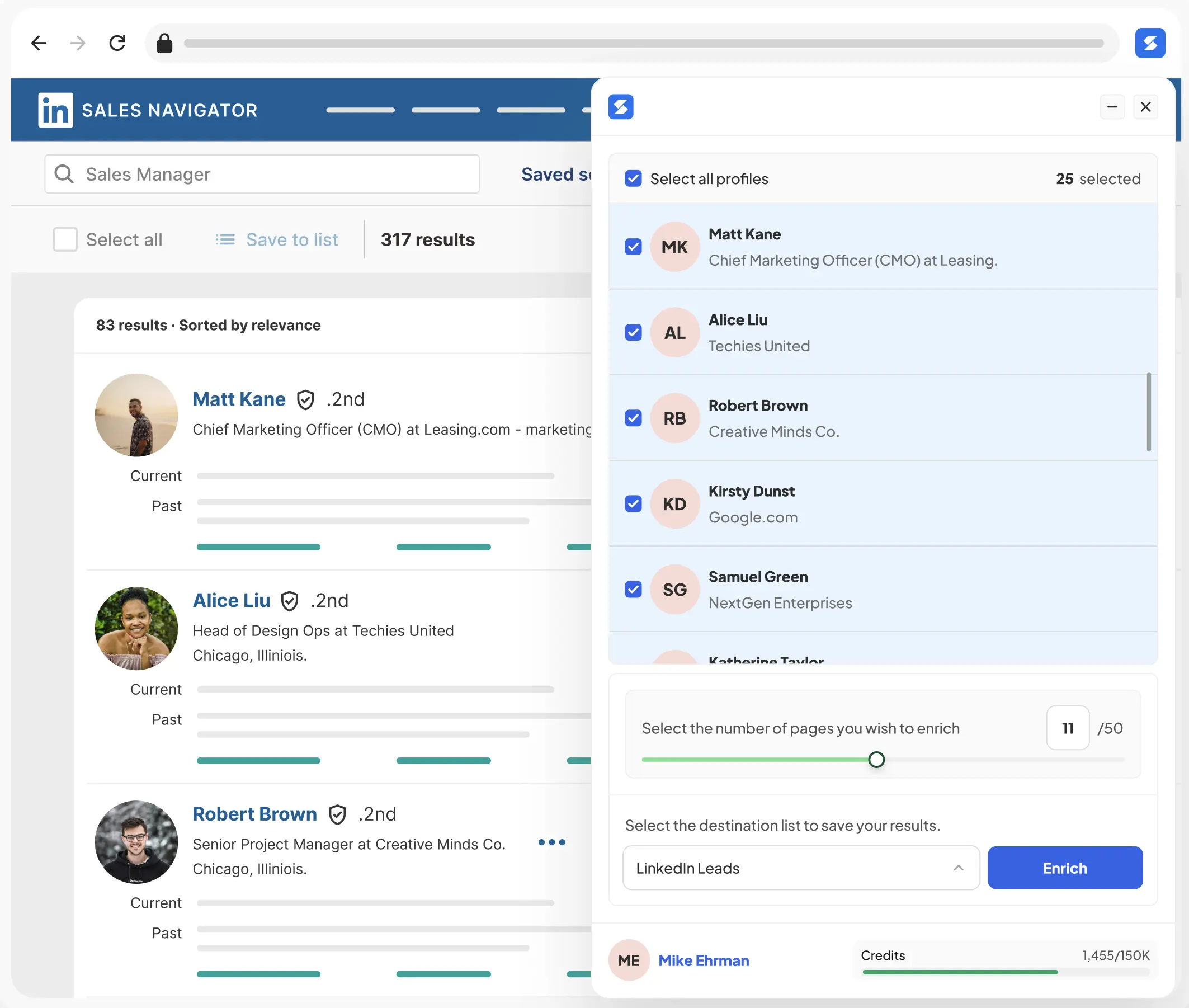
Verified emails for prospects you can't InMail
Sales Navigator gives you the right prospects — Skrapp gives you their verified emails and saves them to your lists so you can reach out on your own terms. Works inside Sales Navigator People Search, Lead Lists, Account Maps, and saved searches. Extract verified emails from 2nd- and 3rd-degree connections you can't message through InMail, then run email sequences that actually convert.
Every address is verified against the company mail server and returned with a confidence score, so you can prioritise the leads most likely to land.
Keep your Sales Navigator workspace organized
Skrapp's extension also auto-saves enriched leads back to your Sales Navigator lists and supports one-click auto-follow from any profile or search result — so your Sales Navigator workspace stays organized as you prospect.
- Works inside Sales Navigator People Search, Lead Lists, and Account Lists
- Auto-save enriched leads to your Sales Navigator lists — no manual exports
- Auto-follow prospects in one click from profiles or search results
- Compatible with Sales Navigator Core, Advanced, and Advanced Plus
How to export Sales Navigator leads
From search to CSV in four steps.
Install the Skrapp extension
Add Skrapp to Chrome — free, no credit card. It activates automatically on LinkedIn and Sales Navigator.
Add to ChromeOpen a Sales Navigator search or list
Run a People Search, open a saved Lead List, or browse an Account Map.
Click the Skrapp icon to enrich
Skrapp reveals verified emails, roles, seniority, and company data for every prospect on the page.
Export to CSV or save to lists
Download the enriched list as CSV, sync it to your CRM, or auto-save leads back to Sales Navigator.
Trusted for accuracy. Built for scale.
3B+
Searches processed
97%
Email verification accuracy
200M+
B2B leads
40M+
Company profiles
Frequently asked questions about Sales Navigator
Sales Navigator doesn’t expose email addresses, but you can extract them with a Chrome extension. Skrapp works inside Sales Navigator People Search, Lead Lists, Account Maps, and saved searches — including 2nd- and 3rd-degree connections you can’t message via InMail. Enriched leads auto-save back to your Sales Navigator lists. Compatible with Core, Advanced, and Advanced Plus.
Sales Navigator has no built-in export, so you use a Chrome extension. Install Skrapp, open any People Search or Lead List, and click the Skrapp icon — it enriches every prospect with a verified email, role, seniority, and company data, then lets you export the whole list to CSV or save it to your CRM in one click.
Yes. Skrapp exports enriched Sales Navigator lead lists as CSV files, which open directly in Excel, Google Sheets, or any CRM. Each row includes the verified email, verification status, job title, seniority, and company details.
Open a Sales Navigator profile, search, or lead list and click the Skrapp extension. Skrapp finds and verifies the business email for each prospect in seconds — including 2nd- and 3rd-degree connections you can't message with InMail.
Skrapp works with every Sales Navigator tier — Core, Advanced, and Advanced Plus — as well as standard LinkedIn and Recruiter.
Yes. When you enrich a Sales Navigator search or Lead List, Skrapp can automatically save the enriched leads back to your Sales Navigator workspace — so your lists stay organized as you prospect. You can also export everything to CSV.
Yes. Skrapp finds verified emails for 2nd- and 3rd-degree connections — the prospects you normally can't reach without an InMail — so you can contact them directly by email.
Finding professional email addresses from public LinkedIn profiles is legal in most jurisdictions when used for legitimate business purposes. Skrapp accesses only publicly available information and complies with GDPR, CAN-SPAM, and CCPA. You’re responsible for using discovered emails responsibly — honor opt-outs, identify yourself clearly, and follow local outreach regulations in the recipient’s jurisdiction.
Yes. Skrapp’s LinkedIn email finder is free to start — 50 verified business emails with no credit card required. The free plan includes Chrome extension access on LinkedIn, Sales Navigator, and Recruiter, plus AI-enriched role and seniority data on every lead. Paid plans add bulk extraction, higher monthly limits, and CRM integrations.
Skrapp maintains industry-leading accuracy with a 92% average email search success rate and 97%+ verification accuracy. Its database is refreshed daily to ensure contact and company data remain up to date. Every email is also labelled with a verification status so you know its reliability before you send.
Have more questions? Visit our Help Center.
Start finding LinkedIn emails today
Install the Skrapp Chrome extension in 30 seconds. No credit card required.
4.8 on Chrome