
LinkedIn Recruiter Pricing 2026: Plans, Costs, Features & Alternatives

LinkedIn Recruiter pricing depends on the plan you pick. For example, basic Recruiter Lite costs $170 per month. Higher-tier options, such as Recruiter Professional Services (RPS) and Recruiter Corporate, are sales-gated and start at $800 per month. And when you add extra InMail credits and team seats, your monthly hiring bill rises even more.
Which option gives you all the features you need without overpaying? The one that suits your actual hiring workflow, say, the number of open roles and the extent of your outreach. Sometimes, a lower-level Recruiter plan paired with a data enrichment tool like Skrapp works better than an enterprise contract.
In this guide, I’ll describe LinkedIn’s main hiring products and how much they’ll cost you, hidden fees included. You’ll also discover three budget-friendlier alternatives to keep your hiring on track.
Search candidate emails directly from LinkedIn profiles
Install the LinkedIn ExtensionWhat Is LinkedIn Recruiter and How Does It Work?
LinkedIn Recruiter is one of LinkedIn’s hiring products, available to users with a personal or premium LinkedIn account. It covers four main recruiting stages: sourcing, connecting, managing, and planning. Here’s what happens at each:
- Sourcing: Recruiter lets you run precise searches with advanced filters, such as skills, seniority, location, and many more, alongside Boolean logic. You can also use AI-powered Recommended Matches that suggest candidates who are 35% more likely to respond than others.
- Connecting: With a single LinkedIn Recruiter seat, you can send up to 150 InMails to candidates outside your network. Plus, you can use Suggested Actions to automate some of the outreach tasks.
- Managing: Recruiter supports your hiring team with collaboration features. These include shared projects, search histories, profiles, and candidate notes. For an even more centralized view, you can sync data with your applicant tracking system (ATS).
- Planning: You can use built-in reporting and analytics to improve your hiring strategies. LinkedIn Recruiter lets you track candidates, InMail performance, job posting effectiveness, and other recruiting metrics.
When you look at it, the workflow is as follows:
LinkedIn Recruiter Cost and Features
There are three core LinkedIn Recruiter plans: Recruiter Lite, Recruiter Professional Services (RPS and premium RPS+), and Recruiter Corporate.
Here’s how their costs and features compare:
| LinkedIn Recruiter Corporate | LinkedIn RPS+ | LinkedIn RPS | LinkedIn Recruiter Lite | |
|---|---|---|---|---|
| Cost | Custom pricing $9,600+ per year per seat | Custom pricing $6,000–$10,000 per year per seat | Custom pricing $6,000–$10,000 per year per seat | $170 per month per seat, $270 per month per 2–5 seats $1,680 per year per seat, $2,670 per year per 2–5 seats |
| Billing cycle | Annual | Annual | Annual | Monthly or annual |
| Network access | Full network access | Up to 3rd-degree connections + 50 monthly out-of-network unlocks | Up to 3rd-degree connections + 30 monthly out-of-network unlocks | Up to 3rd-degree connections |
| Search filters | 40+ filters | 40+ filters | 40+ filters | 20+ filters |
| Monthly InMails | 150 per seat | 140 per seat | 100 per seat | 30 per seat |
| Collaboration | Fully supported | Fully supported | Fully supported | Supported, up to 5 seats |
| Analytics and reporting | InMail, job, usage, and pipeline analytics + custom reporting | InMail, job, usage, and pipeline analytics + custom reporting | InMail, job, usage, and pipeline analytics + custom reporting | InMail and job analytics and reporting |
| Best for | Mid-market and enterprise companies | Staffing agencies and large recruiting teams needing AI and business development tools | Staffing agencies and large recruiting teams | Individual recruiters and small businesses |
LinkedIn Recruiter Lite features
LinkedIn Recruiter Lite is the starter-level recruiting solution. It works well for solo recruiters and small teams that don’t hire at high volume. Its main features include:
- Access to LinkedIn members up to your 3rd-degree network
- Over 20 advanced search filters
- 30 InMail messages per month per seat, with the option to buy up to 70 extra
30 InMails not enough? Skip the extra credits and find verified work emails instead
Try Skrapp FreeLinkedIn Recruiter Corporate features
LinkedIn Recruiter Corporate, or simply LinkedIn Recruiter, is an enterprise-grade solution for companies with steady, high-volume hiring needs. It’s the most feature-rich of all LinkedIn Recruiter options, offering:
- Full access to LinkedIn’s network of more than 1 billion members
- Over 40 advanced search filters, including Open to Work and More Likely to Respond
- 150 InMail messages per month per seat with bulk messaging capabilities
- Integration with over 28 ATS partners
- Advanced AI recruiting features
- Advanced analytics and reporting
- Hiring Assistant, an AI add-on, for sourcing, shortlisting, and messaging candidates
LinkedIn Recruiter Professional Services features
LinkedIn Recruiter Professional Services (RPS) is made specifically for staffing agencies and hiring teams that juggle multiple clients or projects at once. Like Corporate, it supports recruitment at scale.
RPS and RPS+ share many of the same core features:
- Access up to 3rd-degree connections with 30 monthly out-of-network unlocks in RPS and 50 unlocks in RPS+
- Over 40 advanced search filters, including Open to Work and More Likely to Respond
- 100 InMail messages per month per seat in RPS and 140 InMail messages in RPS+
- Integration with over 28 ATS partners
- Basic AI recruiting features in RPS, advanced in RPS+
- Advanced analytics and reporting
- Talent Insights for up-to-date talent and market intelligence
The main difference is that RPS+ brings extra power to agency growth. You get the Hiring Assistant add-on and a Business Development mode that covers AI-assisted messaging, search, and other recruiting activities.
LinkedIn Recruiter vs. Recruiter Lite: Key Differences
Unless you have a staffing agency, you can set RPS and RPS+ aside. Most in-house hiring teams choose between Recruiter Corporate and Recruiter Lite pricing.
Since the price gap is significant, it’s worth comparing these plans more thoroughly. Here’s how they differ across the four stages of recruitment:
| LinkedIn Recruiter Lite | LinkedIn Recruiter Corporate | |
|---|---|---|
| Sourcing |
|
|
| Connecting |
|
|
| Managing |
|
|
| Planning |
|
|
What you get with LinkedIn Recruiter Corporate
LinkedIn Recruiter costs more, but it also includes more features. Compared to Lite, you get the following perks:
- Unrestricted search, as you can view every professional on LinkedIn — not just those within your 3rd-degree reach
- More efficient sourcing, especially for hard-to-fill roles, with advanced search parameters, Boolean strings, and AI-powered recommendations
- Better candidate engagement through a larger number of InMails, bulk outreach, and AI-drafted messages
- Improved collaboration and analytics with Hiring Assistant, ATS integrations, custom reports, and more data that can be studied
Contract terms to know
Before committing to a LinkedIn Recruiter subscription, you should know what you’re actually signing up for.
For starters, Recruiter Corporate is strictly an annual deal. So you’ll need the budget for a substantial upfront investment.
Contracts renew automatically. Unless you aim to continue using Corporate for another year, add the cancellation deadline to your calendar. Check in with your sales rep to learn what your specific cancellation terms are.
If you leave the platform, you’ll lose access to your saved searches, projects, candidate notes, and message threads. Explore what data you can export and do so before your contract expires.
One last thing: your initial LinkedIn Recruiting pricing won’t stay locked forever. In fact, HootRecruit found that rates increase by around 15% year over year. Make sure to factor this into your budget.
Export your candidate contacts before your contract expires
See How Export WorksHow to negotiate LinkedIn Recruiter prices
You might wonder why there is no certain answer to the question: how much does LinkedIn Recruiter cost? That’s because LinkedIn Recruiter price is custom-quoted and open to negotiation.
Here are three tactics to get better terms from your sales rep:
- Get your timing right: Microsoft (LinkedIn’s parent company) closes its fiscal year on June 30th, making late June the best time to negotiate a discount. The last two weeks of any quarter (March, June, September, and December) also work well, as sales reps are under the most pressure to close deals.
- Negotiate volume discounts: If you need multiple seats, tell the sales team early on. Buying in bulk may give you more room to negotiate the per-user price down.
- Lock in an annual rate cap: Given that LinkedIn Recruiter license cost grows each year, ask whether you can cap future increases. Aim to get a written clause in your contract that limits annual spikes to a 5% ceiling.
LinkedIn Recruiter Hidden Costs: What Else Do You Pay For?
The LinkedIn Recruiter cost per seat isn’t the only fee you’ll pay. Depending on how you use the platform, you may need to budget for add-ons, extra InMails, and various other things.
Here are the main hidden (or simply additional) expenses to keep in mind:
Extra InMail credits
If you use all your monthly InMails mid-search, you’ll need to buy more to keep in touch with the candidates. LinkedIn InMail cost is around $10 per credit.
This may seem fine for a few extra messages. But when you grow your outreach, let’s say from 30 to 100 candidates, you’d need roughly 70 more credits. That’s another $700 on top of your LinkedIn Recruiter subscription cost.
Promoted job postings
LinkedIn lets you post jobs for free. But to really get noticed by candidates, you’ll have to promote your listings at around $500 per post. If you’re hiring for several roles at once, that can add thousands to your total spend.
Additional Recruiter seat costs
Once you ask your sales rep, “How much does a LinkedIn Recruiter seat cost?” be realistic about how many licenses you actually need. You might negotiate a volume discount, or you might pay full price. Either way, every extra seat will impact the final cost of LinkedIn Recruiter.
ATS or recruiting CRM
While not a fee from LinkedIn itself, third-party hiring tools add another recurring expense. Both your ATS and CRM can simplify candidate sourcing and recruitment, but they charge their own subscription cost.
Email finding and verification solutions
Email finding and verification tools are another optional expense. However, they’re highly recommended. They let you get in touch with candidates without burning your InMail messages. Our LinkedIn email finder, for example, costs $39 per month and includes up to 2,000 email credits.
Not ready for Corporate pricing? Reach more candidates by email instead
Get Skrapp for LinkedInBest LinkedIn Recruiter Alternatives for Lower Hiring Costs
LinkedIn Recruiter Corporate pricing is steep. If you don’t need all of its features, aren’t ready for an annual commitment, or simply want more outreach capacity for less money, you have other options.
Here are three alternatives to LinkedIn Recruiter worth considering:
1. Use email to reduce dependence on InMail
Although LinkedIn Recruiter gives you a large pool of candidates and strong filtering options, outreach is still a problem. Even 150 InMails per seat may be limiting when you’re trying to fill multiple roles simultaneously.
Luckily, pairing your search with our Skrapp extension increases your outreach volume. Our basic plan offers 2,000 email credits, far more than the Corporate InMail allowance.
Here’s what the workflow looks like:
In Skrapp, you can find email addresses individually or in bulk. Just follow these steps:
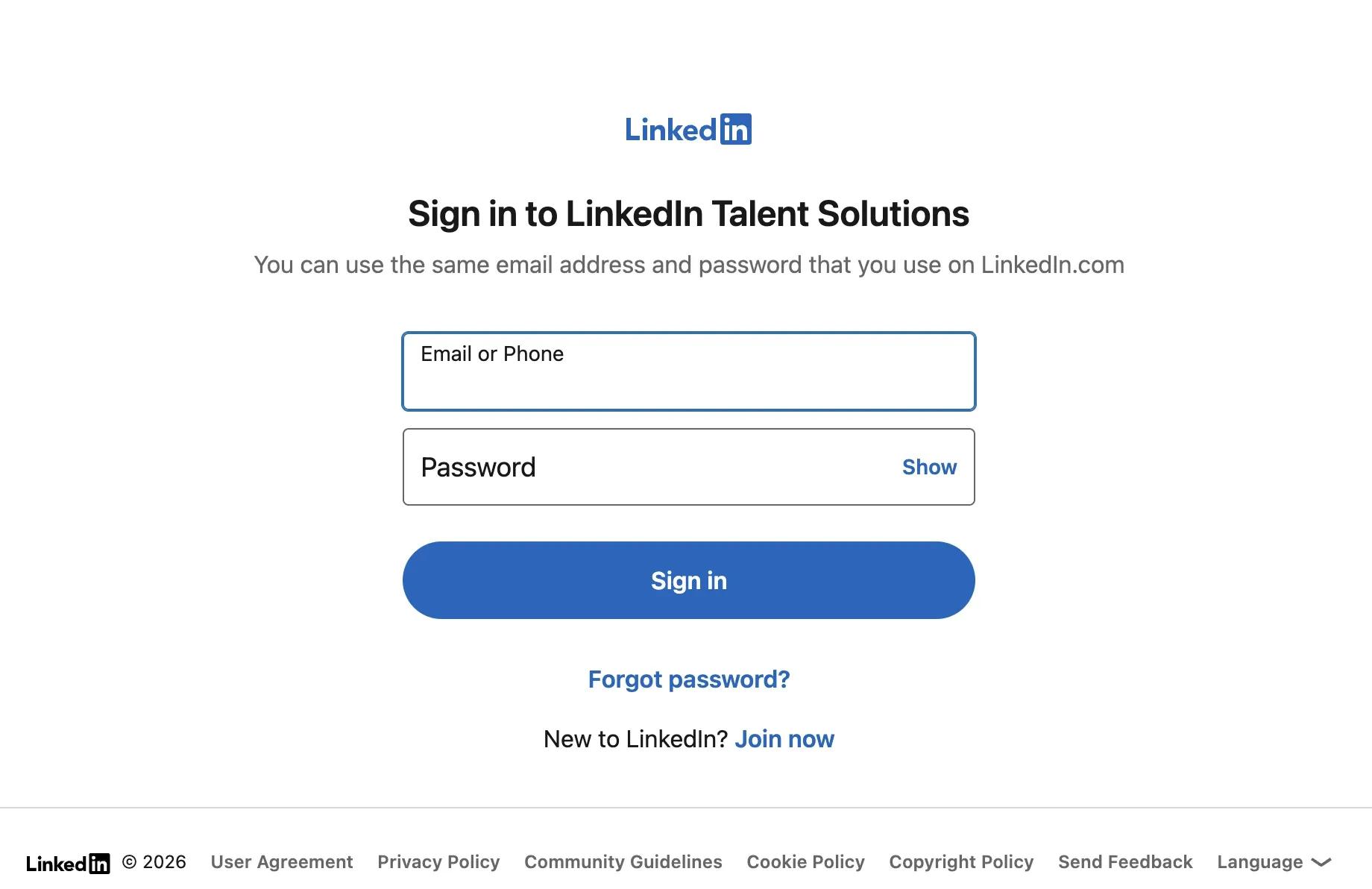
- Log in to LinkedIn Recruiter
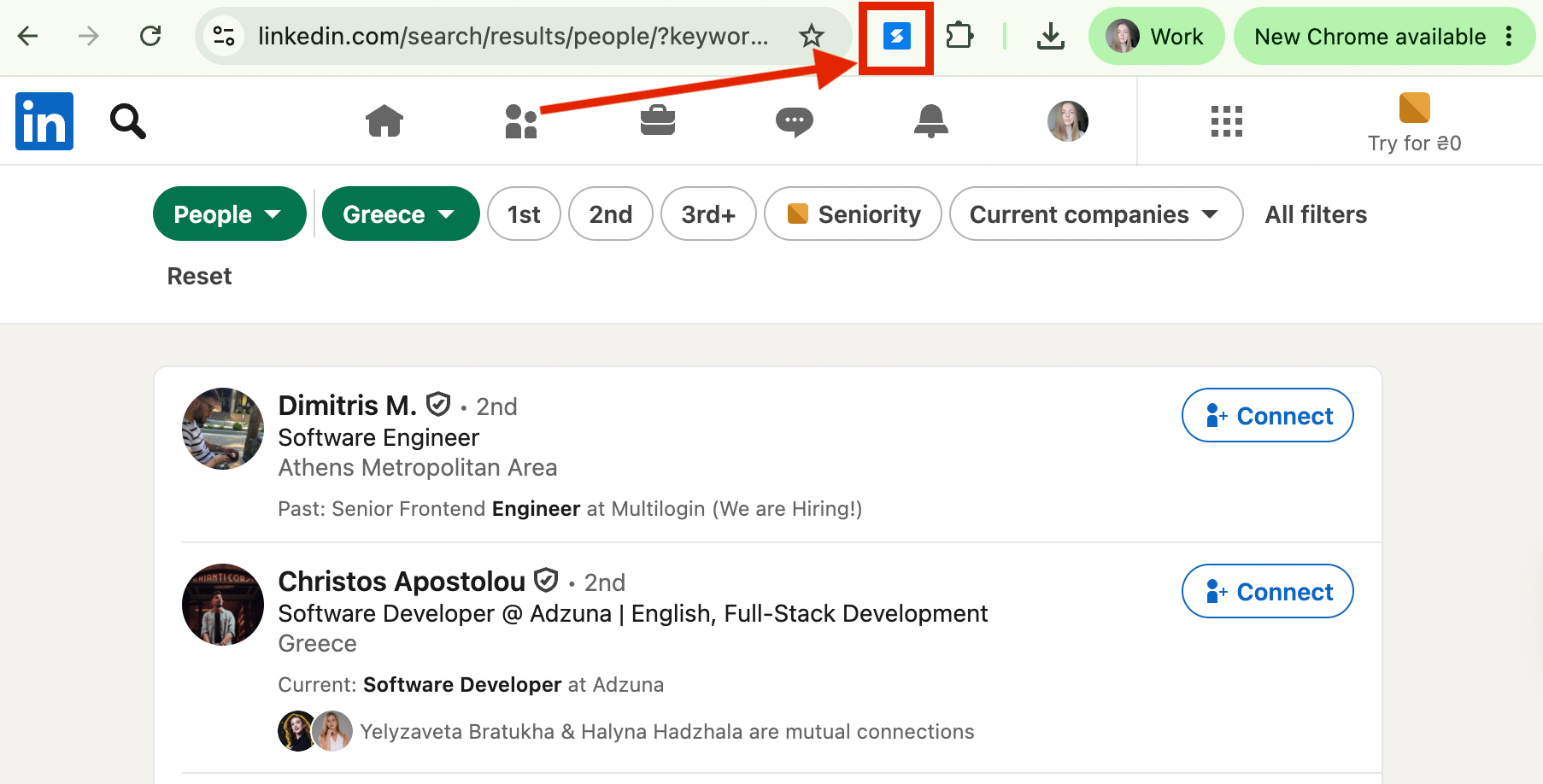
- Search for candidates by job title, company name, or other keywords. When the search results page appears, open the Skrapp Chrome extension.
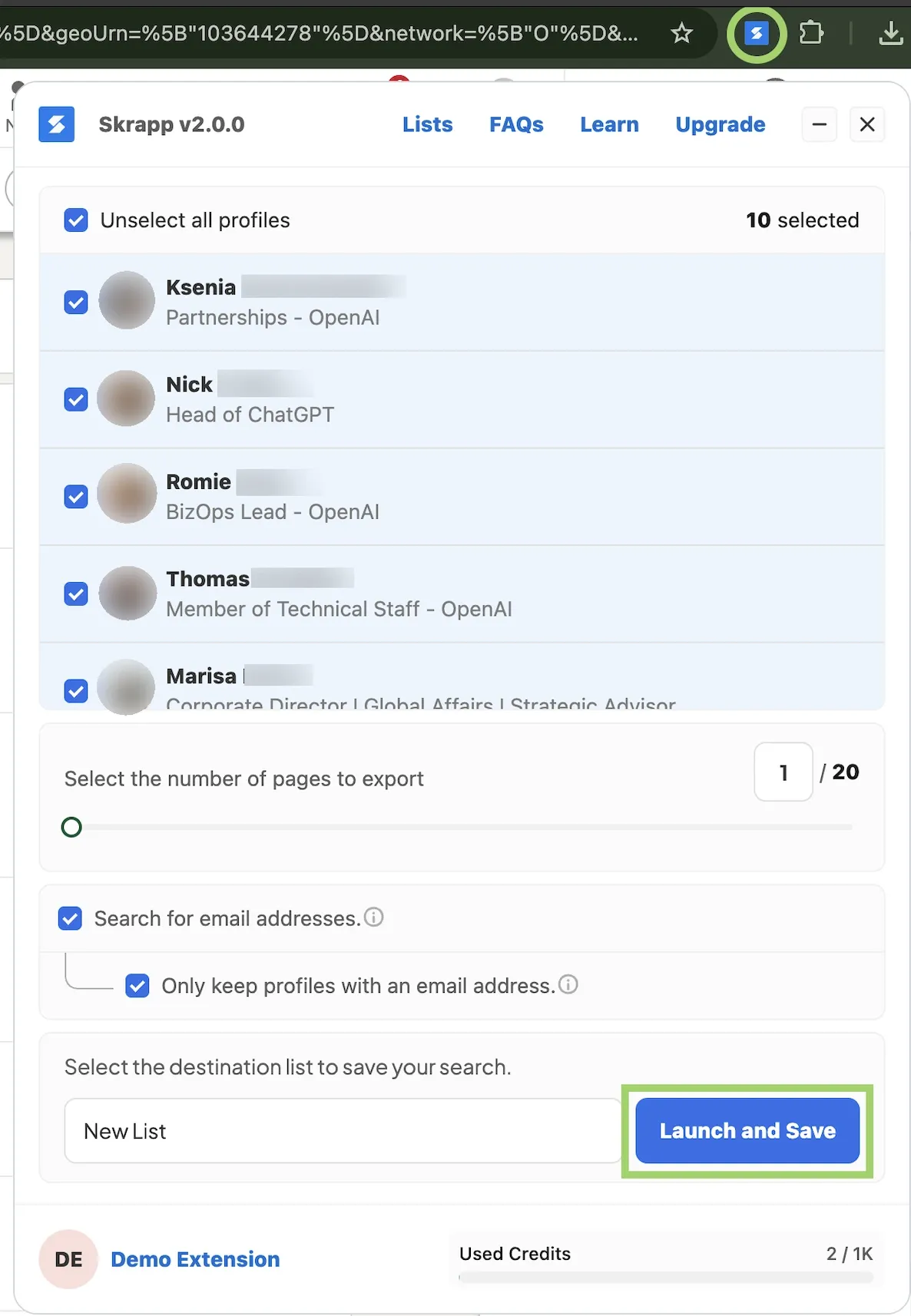
- Select profiles individually or in bulk to extract candidate data, such as names, current employers, and verified work email addresses.
- Use Skrapp's Auto Connect and Follow feature to automatically connect with and follow the candidates you’re interested in reaching out to.

- Save your results to Skrapp lists or export them as .CSV or .XLSX
Combine any LinkedIn plan with Skrapp to unlock high-volume outreach
Explore the Chrome Extension2. Consider Sales Navigator + email enrichment tool
Sales Navigator is probably one of the least obvious LinkedIn Recruiter alternatives. Originally built for sales, it’s suitable for hiring teams too. It gives you over 50 advanced search filters, access to the entire LinkedIn database, and 50 monthly InMails at a very attractive price.
When combined with Skrapp, Sales Navigator can truly compete with Recruiter Corporate.
| Sales Navigator Core + Skrapp | Recruiter Corporate | |
|---|---|---|
| Monthly price | $119.99 + $39 | $800+ |
| Pricing model | Monthly or annual billing | Annual billing |
| Outreach capacity | 50 InMails + 2,000 email credits | 150 InMails |
| Bulk messaging | Skrapp auto-connect and follow within LinkedIn limits + automated email campaigns | Up to 25 InMails at once |
| Candidate and company insights | Mass contact enrichment with Skrapp | Built-in recruiting insights |
| Bulk contact export | Available, with professional email verification | Available, without professional email verification |
| Integrations | CRM integrations only in Sales Navigator Advanced Plus or via Skrapp | 28+ ATS partners |
If you want to learn more about how Sales Navigator compares with LinkedIn Recruiter, check out our recent guide.
3. Save on Recruiter with a lower-cost plan + email finder
If LinkedIn Recruiter cost per year is too overwhelming, combine lower-tier solutions with an email finder. Here are two combinations you can try:
- Recruiter Lite + Skrapp
- LinkedIn Free + Skrapp
Here’s how LinkedIn Recruiter Lite cost and features, plus Skrapp, compare with Corporate:
| Recruiter Lite + Skrapp | Recruiter Corporate | |
|---|---|---|
| Monthly price | $170 + $39 | $800+ |
| Pricing model | Monthly or annual billing | Annual billing |
| Outreach capacity | 30 InMails + 2,000 email credits | 150 InMails |
| Bulk messaging | Skrapp auto-connect and follow within LinkedIn limits + automated email campaigns | Up to 25 InMails at once |
| Candidate and company insights | Mass contact enrichment with Skrapp | Built-in recruiting insights |
| Bulk contact export | Available, with professional email verification | Available, without professional email verification |
| Integrations | CRM integrations via Skrapp | 28+ ATS partners |
Is LinkedIn Recruiter Worth It?
Your choice and LinkedIn Talent Solutions pricing totally depend on the plan. To decide which option makes the most sense, weigh your hiring volume and outreach needs against your budget. As a rule of thumb:
- Go with Recruiter Corporate if you’re a medium-to-enterprise company filling dozens of roles each quarter
- Choose RPS or RPS+ if you’re a third-party staffing agency that requires client management features
- Stick to Recruiter Lite if you’re a solo recruiter or a small team with occasional hires
If LinkedIn Recruiter Corporate cost is too high and standard InMail allowances aren’t enough, consider alternatives. Using Sales Navigator, Recruiter Lite, or the free LinkedIn version with Skrapp gives you thousands of verified work emails and the auto-connect feature for large-scale outreach.
Turn shortlisted candidates into connections automatically, within LinkedIn's own limits
Install the LinkedIn ExtensionFAQ: LinkedIn Recruiter Pricing
How much is LinkedIn Recruiter?
LinkedIn Recruiter Lite starts at $170/month ($1,680/year) per seat. The higher-tier Recruiter Corporate plan is custom-quoted and starts at roughly $9,600/year ($800+/month) per seat, with final pricing depending on the number of seats, company size, and negotiated terms.
What is the difference between LinkedIn Recruiter and Recruiter Lite?
Recruiter Lite is the entry-level plan built for solo recruiters, with 20+ search filters, 30 InMails/month, and access to up to 3rd-degree connections. Recruiter Corporate (often just called "LinkedIn Recruiter") unlocks full network access, 40+ filters, 150 InMails/month, ATS integrations, and AI-powered sourcing tools, at a much higher price point.
How much does a LinkedIn Recruiter seat cost?
Each additional Recruiter Corporate seat is billed per user, typically starting around $9,600/year, though volume discounts are common for teams buying multiple seats. Recruiter Lite seats are cheaper, starting at $170/month per user with lower per-seat pricing for 2–5 seats.
How much does a LinkedIn Recruiter seat cost?
Each additional Recruiter Corporate seat is billed per user, typically starting around $9,600/year, though volume discounts are common for teams buying multiple seats. Recruiter Lite seats are cheaper, starting at $170/month per user with lower per-seat pricing for 2–5 seats.
Does LinkedIn Recruiter pricing increase every year?
Yes. Recruiter Corporate contracts typically renew automatically, and rates tend to rise by around 15% year over year. It's worth negotiating a rate-cap clause (e.g., capping increases at 5%) before signing.
What's included in LinkedIn Recruiter Corporate that Lite doesn't have?
Corporate adds full access to LinkedIn's entire network (not just 3rd-degree connections), 40+ advanced filters including "Open to Work" and "More Likely to Respond," bulk messaging, AI-drafted InMails, ATS integrations with 28+ partners, and advanced analytics, none of which are available on Lite. If ATS integration is the main feature you're after, a data enrichment tool like Skrapp can bridge that gap on Lite by exporting candidate contacts to CSV or XLSX for manual or semi-automated import into most ATS or CRM tools.
What is LinkedIn Recruiter Professional Services (RPS)?
RPS and RPS+ are Recruiter plans built for staffing agencies and high-volume recruiting teams that manage multiple clients. They cost roughly $6,000–$10,000/year per seat and include 100–140 monthly InMails, advanced filters, and (in RPS+) AI-assisted business development tools.
What are the cheapest alternatives to LinkedIn Recruiter Corporate?
You can get much of the outreach functionality of LinkedIn Corporate without paying as much by combining a lower-cost LinkedIn plan, such as Recruiter Lite or Sales Navigator, with an email-finding tool like Skrapp. Because email outreach doesn't rely on InMail credits, this setup can be a more affordable option.
Skrapp's Chrome extension also provides a couple of features that aren't built into Lite, including Auto Connect and Follow. These can help automate outreach to shortlisted candidates while staying within LinkedIn's limits. You can also export candidate information, including names, employers, and verified work emails, in CSV or XLSX format for use with spreadsheets, ATS platforms, or email campaigns.
Can I export candidate data or automate outreach directly from LinkedIn Recruiter?
LinkedIn Recruiter doesn't have built-in bulk export or auto-connect tools. Corporate primarily adds features such as bulk messaging and ATS syncing, while Lite focuses on manual, one-to-one outreach.
Some recruiters use the Skrapp Chrome extension alongside Recruiter Lite, another Recruiter plan, or even a free LinkedIn account. Skrapp can be used to find verified work emails from candidate profiles, send connection requests and follow through its Auto Connect and Follow features, and export the results to a Skrapp list or to CSV or XLSX.
Exporting the data can also be useful when a Recruiter contract is about to end, as it gives recruiters a separate copy of their candidate information rather than keeping everything within LinkedIn.
Is LinkedIn Recruiter worth the cost?
It depends on hiring volume. Recruiter Corporate is worth it for mid-market or enterprise teams filling dozens of roles per quarter that need full network access and ATS integration. Solo recruiters or small teams with occasional hires are usually better served by Recruiter Lite or a lower-cost alternative paired with an email enrichment tool like Skrapp, which adds a work email finder, Auto Connect and Follow, and CSV/XLSX export without the annual Corporate commitment.